1. Write a Java program that throws an exception and catch it using a try-catch block.
            class Exception
            {
                public static void main(String[] args)
                {
                    try {
                        int[] arr = new int[5];

                        arr[10] = 50; // This statement will throw an exception

                    } catch (ArrayIndexOutOfBoundsException e) {
                        System.out.println("Exception caught: " + e);
                    }
                }
            }
Output

2. Write a Java program to create a method that takes an integer as a parameter and throws an exception if the number is odd.
            class OddNum_Exp {
              public static void main(String x[]) {
                int a =4;
                checknum(a);
                a =5;
                checknum(a);
              }

              public static void checknum(int a) {
                try {
                  checkEvenNum(a);
                  System.out.println(a + " is even.");
                } catch (IllegalArgumentException e) {
                 System.out.println("Exception :" + e.getMessage());
                }
              }

              public static void checkEvenNum(int b) {
                if (b % 2 != 0) {
                  throw new IllegalArgumentException(b + " is odd.");
                }
              }
            }
Output

3. Write a Java program to create a method that reads a file and throws an exception if the file is not found
            import java.io.File;
            import java.io.FileNotFoundException;
            import java.util.Scanner;

            class Read_File {
              public static void main(String x[] ) {
                try {
                  r_File("test2.txt");
                } catch (FileNotFoundException e) {
                  System.out.println("Exception: " + e.getMessage());
                }
              }

              public static void r_File(String fname) throws FileNotFoundException {
                File file = new File(fname);
                Scanner scanner = new Scanner(file);


                while (scanner.hasNextLine()) {
                  String line = scanner.nextLine();
                  System.out.println(line);
                }

                scanner.close();
              }
            }
Output
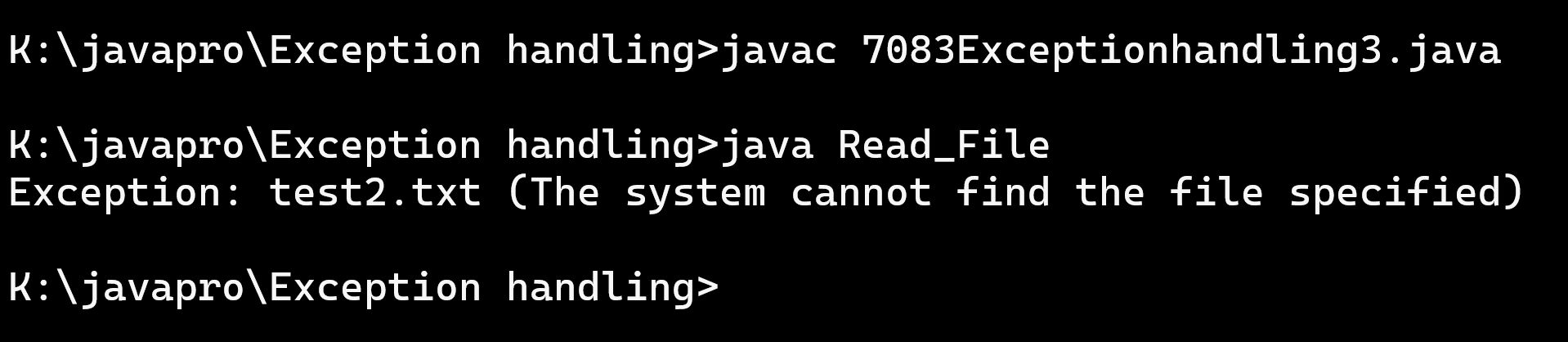
4. Write a Java program that reads a list of numbers from a file and throws an exception if any of the numbers are positive
            import java.io.BufferedReader;
            import java.io.File;
            import java.io.FileNotFoundException;
            import java.io.FileReader;
            import java.io.IOException;

            class exception4 {
                class PositiveNumberException extends Exception {
                    public PositiveNumberException(String message) {
                        super(message);
                    }
                }
                public static void main(String[] args) {
                    File filename = new File("numbers.txt");

                    try {
                        new exception4().checkPositiveNumbers(filename);
                        System.out.println("No positive numbers found.");
                    } catch (PositiveNumberException e) {
                        System.err.println("Exception: " + e.getMessage());
                    } catch (IOException e) {
                        System.err.println("Error reading the file: " + e.getMessage());
                    }
                }

                void checkPositiveNumbers(File filename) throws IOException, PositiveNumberException {
                    try {
                        BufferedReader reader = new BufferedReader(new FileReader(filename));
                        String line;
                        while ((line = reader.readLine()) != null) {
                            int number = Integer.parseInt(line);
                            if (number > 0) {
                                throw new exception4.PositiveNumberException("Positive number found: " + number);
                            }
                        }
                        reader.close();
                    } catch (FileNotFoundException e){
                        throw new IOException("The specified file was not found.", e);
                    }
                }
            }
Output
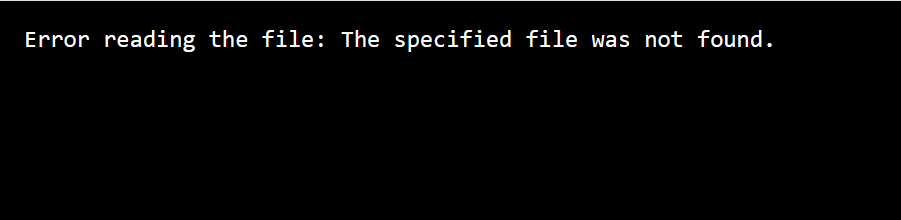
5. Write a Java program that reads a file and throws an exception if the file is empty.
            // Write a Java program that reads a file and throws an exception if the file is empty.
            import java.io.File;
            import java.io.FileReader;
            import java.io.IOException;

            class EmptyFileException extends Exception {
                public EmptyFileException(String message) {
                    super(message);
                }
            }

            class CheckEmptyFile {
                public static void main(String[] args) {
                    try {
                        checkFileNotEmpty("data.txt");
                    } catch (EmptyFileException e) {
                        System.out.println("Empty file detected: " + e.getMessage());
                    } catch (IOException e) {
                        System.out.println("File not found or cannot be read: " + e.getMessage());
                    }
                }

                public static void checkFileNotEmpty(String fileName) throws IOException, EmptyFileException {
                    File file = new File(fileName);

                    if (!file.exists() || file.length() == 0) {
                        throw new EmptyFileException("File is empty or does not exist.");
                    }

                    FileReader reader = new FileReader(file);
                    reader.close();
                }
            }
Output

6. Write a Java program that reads a list of integers from the user and throws an exception if any numbers are duplicates
            /* Write a Java Program that reads a list of integers from the user and throws an exception if any numbers are duplicates.*/

            import java.util.*;


            class DuplicateChecker {
                public static void main(String[] args) {
                    Scanner scanner = new Scanner(System.in);
                    System.out.print("Enter the number of elements: ");
                    int n = scanner.nextInt();

                    List numbers = new ArrayList<>();
                    System.out.println("Enter " + n + " integers:");

                    try {
                        for (int i = 0; i < n; i++) {
                            int num = scanner.nextInt();
                            if (numbers.contains(num)) {
                                throw new DuplicateNumberException("Duplicate number found: " + num);
                            }
                            numbers.add(num);
                        }
                        System.out.println("No duplicates found!");
                    } catch (DuplicateNumberException e) {
                        System.out.println(e.getMessage());
                    }
                }
            }
Output

7. Write a Java program to create a method that takes a string as input and throws an exception if the string does not contain vowels.
            import java.util.Scanner;

class vowelchecker
{
public static void main(String args[])
{
try
{
Scanner sc = new Scanner(System.in);
System.out.print("Enter a String : ");
String str = sc.nextLine();
checkForVowels(str);
System.out.println("String Contains Vowels.");
}
catch(NoVowelsException e)
{
System.out.println("Exception : "+e.getMessage());
}
}
static void checkForVowels(String input) throws NoVowelsException
{
if(!input.matches(".*[AEIOUaeiou].*"))
{
throw new NoVowelsException("The Input string does not contains any vowels.");
}
}
}
class NoVowelsException extends Exception
{
public NoVowelsException(String message)
{
   super(message);
}
}
Output

8. Write a Java program to connect the Java API to Database, if connection not successful then throw an exception
//Write a Java program to connect the Java API to Database, if connection not successful then throw an exception


import java.sql.*;
class ExceptionHandle
{
public static void main(String st[])
{
try
{
        Class.forName("com.mysql.jdbc.Driver");
        Connection c=DriverManager.getConnection("jdbc:mysql://localhost:3306/bharat?useSSL=false","root","god123456");
                System.out.println("Connect to database successfully");
        c.close();


        }catch(ClassNotFoundException e){System.out.println("Unable to find class");}
        catch(SQLException e){System.out.println("Fail to connect!");}

}
}
Output

9. Write a Java program to manage the driver with path, username and password, if not successful then throw an exception
            import java.sql.Connection;
            import java.sql.DriverManager;
            import java.sql.SQLException;

            class DatabaseManager {
                public static void main(String[] args) throws ClassNotFoundException {
            //        Class.forName("com.mysql.jdbc.Driver");
                    String dbUrl = "jdbc:mysql://localhost:3306/codevengers";
                    String username = "root";
                    String password = "";

                    try {
                        Connection connection = new DatabaseManager().getConnection(dbUrl, username, password);
                        System.out.println("Connection successfull");
                        connection.close();
                    } catch (DatabaseConnectionException e) {
                        System.out.println("Exception: " + e.getMessage());
                    } catch (SQLException e) {
                        System.out.println("SQL Exception: " + e.getMessage());
                    }
                }

                Connection getConnection(String dbUrl, String username, String password) throws DatabaseConnectionException {
                    try {
                        return DriverManager.getConnection(dbUrl, username, password);
                    } catch (SQLException e) {
                        throw new DatabaseConnectionException("Failed to connect to the database: " + e.getMessage());
                    }
                }
            }

            class DatabaseConnectionException extends Exception {
                public DatabaseConnectionException(String message) {
                    super(message);
                }
            }
Output

10. Write a Java program to throw the SQL Query, insert, delete, update, if not successful then throw an exception
            import java.sql.Connection;
            import java.sql.DriverManager;
            import java.sql.PreparedStatement;
            import java.sql.SQLException;

            class DatabaseOperationExample {


                private static final String JDBC_URL = "jdbc:mysql://localhost:3306/your_database_name";
                private static final String USERNAME = "your_username";
                private static final String PASSWORD = "your_password";

                public static void main(String[] args) {
                    try {

                        Class.forName("com.mysql.cj.jdbc.Driver");


                        try (Connection connection = DriverManager.getConnection(JDBC_URL, USERNAME, PASSWORD)) {

                            if (!insertData(connection, "John Doe", 25, "john@example.com")) {
                                throw new SQLExceptionCustom("Insert operation failed");
                            }


                            if (!updateData(connection, 1, "John Doe Updated")) {
                                throw new SQLExceptionCustom("Update operation failed");
                            }


                            if (!deleteData(connection, 1)) {
                                throw new SQLExceptionCustom("Delete operation failed");
                            }
                        }
                    } catch (ClassNotFoundException | SQLException | SQLExceptionCustom e) {
                        e.printStackTrace();
                    }
                }


                private static boolean insertData(Connection connection, String name, int age, String email) throws SQLException {
                    String insertQuery = "INSERT INTO your_table_name (name, age, email) VALUES (?, ?, ?)";
                    try (PreparedStatement preparedStatement = connection.prepareStatement(insertQuery)) {
                        preparedStatement.setString(1, name);
                        preparedStatement.setInt(2, age);
                        preparedStatement.setString(3, email);
                        int rowsAffected = preparedStatement.executeUpdate();
                        return rowsAffected > 0;
                    }
                }


                private static boolean updateData(Connection connection, int id, String newName) throws SQLException {
                    String updateQuery = "UPDATE your_table_name SET name = ? WHERE id = ?";
                    try (PreparedStatement preparedStatement = connection.prepareStatement(updateQuery)) {
                        preparedStatement.setString(1, newName);
                        preparedStatement.setInt(2, id);
                        int rowsAffected = preparedStatement.executeUpdate();
                        return rowsAffected > 0;
                    }
                }


                private static boolean deleteData(Connection connection, int id) throws SQLException {
                    String deleteQuery = "DELETE FROM your_table_name WHERE id = ?";
                    try (PreparedStatement preparedStatement = connection.prepareStatement(deleteQuery)) {
                        preparedStatement.setInt(1, id);
                        int rowsAffected = preparedStatement.executeUpdate();
                        return rowsAffected > 0;
                    }
                }
            }


            class SQLExceptionCustom extends SQLException {
                public SQLExceptionCustom(String message) {
                    super(message);
                }
            }
Output

11. Write a Java program to show an example of throws Keyword.
            class Main {
              static void checkAge(int age) {
                if (age < 18) {
                  throw new ArithmeticException("Access denied - You must be at least 18 years old.");
                }
                else {
                  System.out.println("Access granted - You are old enough!");
                }
              }

              public static void main(String[] args) {
                checkAge(15); // Set age to 15 (which is below 18...)
              }
            }
Output

12. Write a Java program to show an example of multiple catch
  class multiplecatch{
    public  static void main(String[] args) {

              try{
                   int a[]=new int[5];
                   a[5]=30/0;
                  }
                  catch(ArithmeticException e)
                     {
                      System.out.println("Arithmetic Exception occurs");
                     }
                  catch(ArrayIndexOutOfBoundsException e)
                     {
                      System.out.println("ArrayIndexOutOfBounds Exception occurs");
                     }
                  catch(Exception e)
                     {
                      System.out.println("Parent Exception occurs");
                     }

                 System.out.println("rest of the code");
    }
     }
Output

13. Write a Java program to show an example of nested try block.
            class NestedTryBlock{
              public static void main(String args[]){
              //outer try block
               try{
               //inner try block 1
                 try{
                  System.out.println("going to divide by 0");
                  int b =39/0;
                }
                 //catch block of inner try block 1
                 catch(ArithmeticException e)
                 {
                   System.out.println(e);
                 }


                 //inner try block 2
                 try{
                 int a[]=new int[5];

                 //assigning the value out of array bounds
                  a[5]=4;
                  }

                 //catch block of inner try block 2
                 catch(ArrayIndexOutOfBoundsException e)
                 {
                    System.out.println(e);
                 }


                 System.out.println("other statement");
               }
               //catch block of outer try block
               catch(Exception e)
               {
                 System.out.println("handled the exception (outer catch)");
               }

               System.out.println("normal flow..");
              }
             }
Output
