My sql Tutorials
MySQL tutorial provides basic and advanced concepts of MySQL. Our MySQL tutorial is designed for beginners and professionals. MySQL is a relational database management system based on the Structured Query Language, which is the popular language for accessing and managing the records in the database. MySQL is open-source and free software under the GNU license.

Our MySQL tutorial includes all topics of MySQL database that provides for how to manage database and to manipulate data with the help of various SQL queries. These queries are: insert records, update records, delete records, select records, create tables, drop tables, etc. There are also given MySQL interview questions to help you better understand the MySQL database.
What is Database?
It is very important to understand the database before learning MySQL. A database is an application that stores the organized collection of records. It can be accessed and manage by the user very easily. It allows us to organize data into tables, rows, columns, and indexes to find the relevant information very quickly. Each database contains distinct API for performing database operations such as creating, managing, accessing, and searching the data it stores. Today, many databases available like MySQL, Sybase, Oracle, MongoDB, PostgreSQL, SQL Server, etc. In this section, we are going to focus on MySQL mainly.
What is MySQL?
How MySQL Works?
MySQL follows the working of Client-Server Architecture. This model is designed for the end-users called clients to access the resources from a central computer known as a server using network services. Here, the clients make requests through a graphical user interface (GUI), and the server will give the desired output as soon as the instructions are matched. The process of MySQL environment is the same as the client-server model.
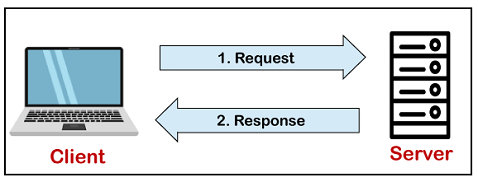
The core of the MySQL database is the MySQL Server. This server is available as a separate program and responsible for handling all the database instructions, statements, or commands. The working of MySQL database with MySQL Server are as follows:
- MySQL creates a database that allows you to build many tables to store and manipulate data and defining the relationship between each table.
- User-Defined Variable
- Local Variable
- System Variable
MySQL Data Types
A Data Type specifies a particular type of data, like integer, floating points, Boolean, etc. It also identifies the possible values for that type, the operations that can be performed on that type, and the way the values of that type are stored. In MySQL, each database table has many columns and contains specific data types for each column.
We can determine the data type in MySQL with the following characteristics:
Data Types
TINYINT
SMALLINT
MEDIUMINT
INT
BIGINT
FLOAT(m,d)
DOUBLE(m,d)
DECIMAL(m,d)
BIT(m)
BOOL
BOOLEAN
String Data Types:
The string data type is used to hold plain text and binary data, for example, files, images, etc. MySQL can perform searching and comparison of string value based on the pattern matching such as LIKE operator, Regular Expressions, etc.
The following table illustrates all string data types that support in MySQL:
| Data Type Syntax | Maximum Size |
|---|---|
| CHAR(size) | It can have a maximum size of 255 characters. |
| VARCHAR(size) | It can have a maximum size of 255 characters. |
| TINYTEXT(size) | It can have a maximum size of 255 characters. |
| TEXT(size) | Maximum size of 65,535 characters. |
| MEDIUMTEXT(size) | It can have a maximum size of 16,777,215 characters. |
| LONGTEXT(size) | It can have a maximum size of 4GB or 4,294,967,295 characters. |
MySQL Variables
Variables are used for storing data or information during the execution of a program. It is a way of labeling data with an appropriate name that helps to understand the program more clearly by the reader. The main purpose of the variable is to store data in memory and can be used throughout the program.
MySQL can use variables in three different ways, which are given below:
User-Defined Variable
Sometimes, we want to pass values from one statement to another statement. The user-defined variable enables us to store a value in one statement and later can refer it to another statement.MySQL provides a SET and SELECT statement to declare and initialize a variable. The user-defined variable name starts with @ symbol.
The user-defined variables are not case-sensitive such as @name and @NAME; both are the same. A user-defined variable declares by one person cannot visible to another person. We can assign the user-defined variable into limited data types like integer, float, decimal, string, or NULL. The user-defined variable can be a maximum of 64 characters in length.
Syntax
The following syntax is used to declare a user-defined variable.
1. By using the SET statement
NOTE: We can use either '=' or ':=' assignment operator with the SET statement.
2. By using the SELECT statement
Example1
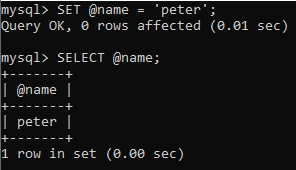
Here, we are going to assign a value to a variable by using the SET statement.
Then, we can display the above value by using the SELECT statement.
Output